
How Botim automated design-to-dev handoff with the Ditto MCP
Read how Botim's design team turned a manual Figma-to-Ditto handoff into a one-line Claude Code plugin, then moved it onto the Ditto MCP.
Botim, UAE’s leading fintech platform serving 170M+ users, run their product content through Ditto. When the manual handoff between Figma and Ditto started eating a sprint's worth of design time, the team built their own solution, first manually then with the Ditto MCP. This is that build, in the words of Nayanika Goje, the design engineer who led it.
The challenge: A structured content system with a manual on-ramp
Botim keeps its product copy in Ditto because it gives them one reusable string for each piece of copy, tied to both Figma and code: stable developer IDs engineers can hardcode once, shared components, variables, and translations — one source of truth rather than duplicates. Language stays consistent, and the team can update something once instead of hunting down every instance — and reuse approved translations rather than starting each one from scratch.
The friction came when getting a new Figma design project properly into that system: working out what already existed and should be reused, what was genuinely new, and what needed variables. Every screen in Botim ran through the same manual sequence:
- Copy comes out of Figma and into Ditto.
- Every string needs a semantic developer ID so engineers can reference it.
- Every hardcoded value (dates, amounts, a card's last four digits) has to become a
{{variable}}. - Then everything gets translated into Arabic — with more languages planned.
The whole design team works in Ditto day to day, so everyone was bound by this flow. Adding 15 to 20 screens and initializing developer IDs took an hour or two per sprint, before any copy work started.
The slow part wasn't the mechanical steps. It was the judgment calls: deciding whether two identical strings were the same text item, or two items that happened to read alike. Get it wrong, and the developer ID process starts to get muddied. Manual, repetitive preparation like this became harder to manage at scale, and the cost showed up downstream as untranslatable strings reached production.
Nayanika rebuilt the team's Ditto automation processes into one the whole team could use.
The solution: A Claude Code plugin, then the Ditto MCP
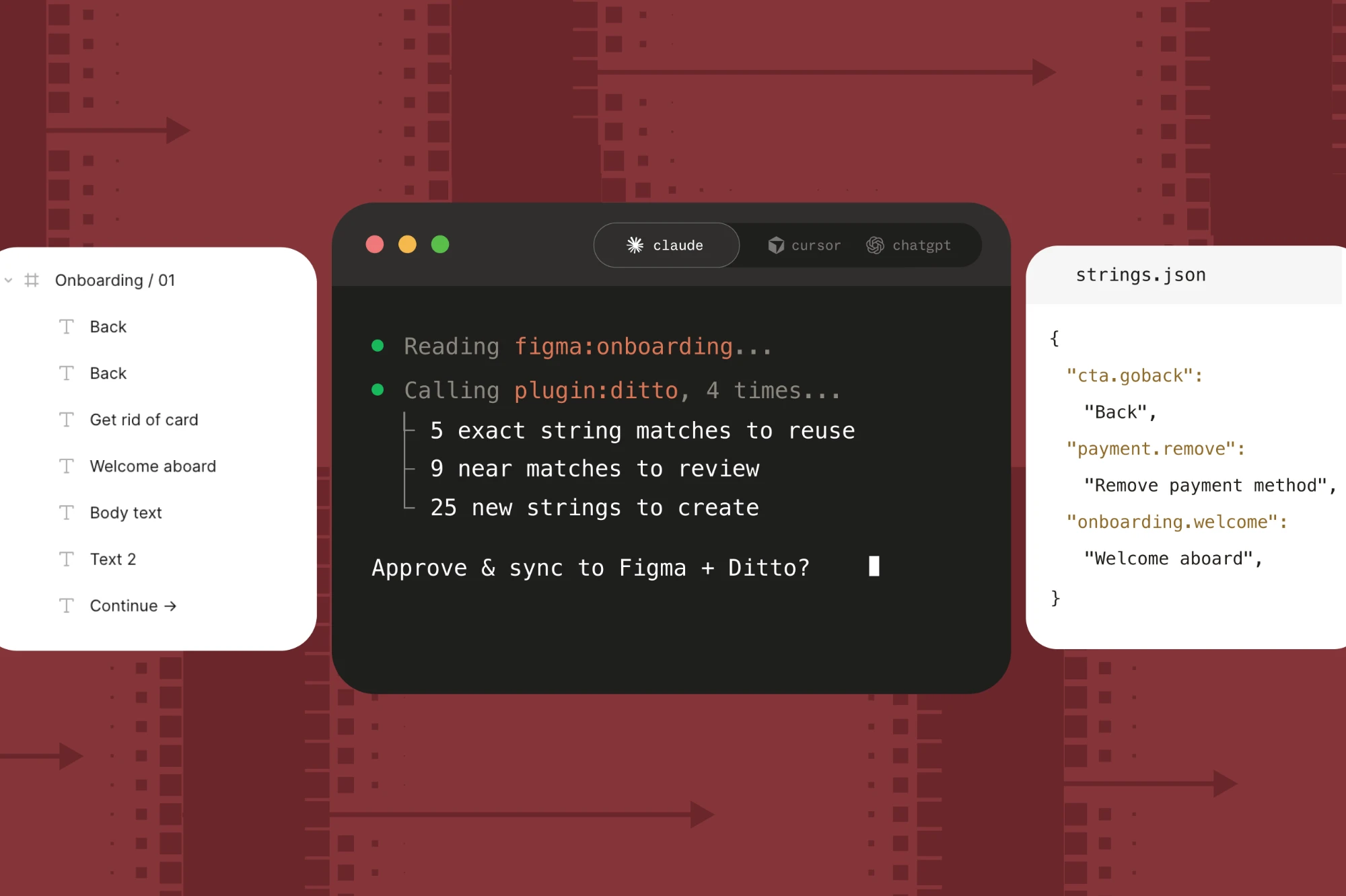
Nayanika built a Claude Code plugin, at a time when Ditto's MCP was read-only, to automate the manual Figma-to-Ditto setup her team had been doing by hand. A designer gives it a Figma frame, and it creates or links the relevant content in Ditto, applies their developer-ID and variable conventions, and prepares translations. It's a one-line install: 21 tools and 3 skills that turn the whole handoff into a single action.
/ditto-handoff: paste a Figma frame link, and copy gets linked into the project, new items get semantic developer IDs, hardcoded values become variables, and the screen translates into a variant if one's mentioned./ditto-translate: glossary-aware translation, drawing on a workspace translation library in Ditto built from previous projects./ditto-review: exports pending translations as a Markdown file a human translator edits, then reads their edits back in.
Paste one Figma link, and the tool creates the text items in Ditto, marks them work-in-progress automatically, pushes every screen at once, and generates a semantic developer ID per string. Its matching logic handles the judgment call by rule instead of by hand: identical copy in the same context links to one item, identical wording in a different context stays separate, and text already in the component library connects to that library component instead of getting created fresh.
Nayanika built this while the Ditto MCP was still read-only. The write capabilities she engineered by hand (renaming developer IDs, linking variables, pushing per-variant text and translations) are now possible with Ditto's expanded MCP.
"A script needs a human to remember it. An MCP tool explains itself to the agent." — Nayanika Goje, Design Engineer
Migrating to the official Ditto MCP
Ditto's MCP lets Claude Code retrieve and update Ditto content directly while working, so the team's workflow can live as reusable skills rather than as a one-off script. Nayanika evaluated it against what she'd already built:
"We tried the official MCP and it's more advanced than what I built, and it handles auth properly so we're not fetching JWT tokens ourselves anymore. That part is a clear improvement." — Nayanika Goje, Design Engineer
The Botim design team is now migrating onto the Ditto MCP. Nayanika is clear about the end state she wants: the Ditto MCP, with her team's skills layered on top.
The impact
The Botim team was able to see some immediate payoff from automating the Ditto integration:
Before: 1–2 hours per sprint to add 15–20 design screens and initialize developer IDs, before any variablization or translation.
After: 5–10 minutes for the whole thing: screens in, variables replaced, first draft of Arabic translations generated.
Before: A project with hundreds of screens was a reason to postpone the handoff.
After: Handoff time no longer scales with project size.
Before: Adoption depended on one person remembering to run a script.
After: The whole design team leverages the Ditto MCP + skills toolset, every sprint.
The handoff dropped from hours to minutes, and developer IDs follow the right structure automatically, which simplifies handoff to code.
And although Nayanika didn’t have a specific number, she says they’ve also been able to noticeably reduce the amount of untranslatable strings that reach production, while translations have gotten more consistent.
Who benefits:
- Designers, who already worked in Ditto daily: the prep disappeared, and handoff stopped being the part of the sprint everyone put off.
- Engineers get keys that are anchored and stable, so they hardcode once and stay out of copy changes.
- Translators moved from ad hoc string dumps to a structured sheet with the glossary already locked and conflicts already flagged. Less rework, and their approved work feeds the translation memory instead of getting re-litigated next sprint.
- The entire product team benefits because copy changes stopped being engineering work. A reword after review is now an edit in Ditto, not a ticket and a release. Feedback that used to wait for a sprint turns around the same day.
The adoption story is as much about standardization as speed. Before, every designer had to learn Ditto's own model individually: how keys work, when to link a duplicate, what breaks if you get it wrong. Now that knowledge lives in the skill, so a new designer doesn't need to hold Ditto's model in their head. They paste a Figma link.
The workflow improves with use, too. Every product the team runs through it surfaces something the skill was getting slightly wrong — usually a redundant key, or content that didn't need to exist — so it keeps getting sharper against real work.
"One person running a script gets better at using the script. A team running a skill makes the skill better." — Nayanika Goje, Design Engineer
Advice for other teams
Asked what she'd tell a team starting with the Ditto MCP today, Nayanika gets specific fast:
"Before you start, agree on your process. Write your matching rules down: same copy in the same place links to one item, same words elsewhere stays separate, anything in the component library points at the library. You're already making those calls in your head — the agent just needs them stated. Same with the glossary and translation memory: hand them over early, and keep a reviewer in the loop." — Nayanika Goje, Design Engineer
Three lessons that go beyond Botim's own stack:
- Tools are capabilities; skills are process. A tool makes work possible. A skill makes it happen the same way twice: same sequence, same guardrails, regardless of who's running it. That's the difference between automating one afternoon and changing how a team works.
- Localization quality is a people process, not a technical one. Glossary, tone, and translation memory need to be first-class context, with a human reviewer in the loop— not an afterthought bolted onto machine translation.
- Build the awkward version yourself first. Hitting every wall personally is how you know what to keep, what to delete, and which assumptions were wrong once the vendor ships the official version. A team that waits for that version gets the tools, but not the judgment.
A busy sprint used to mean messy developer IDs and duplicates the team missed. Now it runs the same way every time, for every designer, across every product. The write capabilities Nayanika engineered by hand are now part of the official Ditto MCP. If you're hitting a wall Ditto doesn't solve yet, we want to hear about it — reach out and tell us what your team needs.
Latest