


AI exposes content problems instead of fixing them, so we need to learn how to expose content problems before they scale.
This is a guest post from the founders of Content Design Hub. In this article, we cover:
AI is like a toddler. It’s incredibly fast at learning but has no context of safety or judgement. It learns from its environment and copies patterns rather than intentions. It must be trained, nurtured and rewarded for good behaviour.
“AI doesn’t create clarity; it scales what already exists.” – Content Design Hub.
Just like a child, AI absorbs content; even the inconsistent and incorrect. It will mimic and repeat all of this with confidence. It does not set the standard and it cannot define what “good” or “bad” looks like. Therefore, AI doesn’t interrogate what it’s given, at least not out-of-the-box.
AI doesn’t inherently understand your brand voice, strategy or governance rules; it mirrors the content and structure of your ecosystem. When that content is wrong or biased, so is your AI’s output. You’ll find that your content inconsistencies will scale and the mess will multiply.
If your brand voice varies across teams, channels or content owners, AI will reflect and amplify those inconsistencies in its output. It learns from what already exists; not what you wish existed.
Without a clear, consistently applied voice, AI-generated content can sound:
Unlike a human writer, AI won’t pause and say, “This doesn’t sound like us.” It just keeps generating.
To encourage AI to use your tone and voice accurately, you can:
Prompt:
What does this 401-error mean?
AI response:
A 401 error on a website means “unauthorised” — the server is blocking access because it can’t verify who you are. In technical terms, the request is missing valid authentication credentials (such as a login, token or permission).
Prompt:
What does this 401-error mean?
AI response:
A 401 error means the website doesn’t recognise you, so it won’t let you in. It can happen when you’re not logged in, your session has expired, or the site didn’t get the right login details.
Any outdated templates, legacy messaging or old positioning stored in your content libraries get baked into AI outputs. You may have buried outdated content, and it’s been long forgotten. But guess what: if AI has access, it will find and use it. AI doesn’t know the content template is obsolete. So, suddenly, outdated patterns show up, replacing or contradicting your instructions.
To avoid outdated content creeping back into existence, start with cleaning up your source material.
Review:
Where humans spot errors or question unusual statements, AI lacks the instinct to do the same. If the source content has inaccuracies, ambiguities or missing information, AI will generate more of it; and with confidence!
We want AI to write a good first draft, helping content creators to speed up the writing process. When AI produces slop that’s full of errors, humans spend more time checking, verifying, editing and reworking content. Instead of reducing workload, AI increases the content maintenance burden.
To avoid AI producing inaccurate content, you need to solidify your governance foundations.
How to improve the accuracy of AI outputs:
When content rules and ownership are not defined, AI may seem to work in mysterious ways. Without agreed roles, responsibilities and style guidance, there’s no stable decision layer for AI to rely on.
AI will not know how to apply governance standards or where the single source of truth lies. Instead of streamlining workflows, AI forces teams to chase down answers, reconcile differences and manually realign.
Ways you can support content automation at scale:
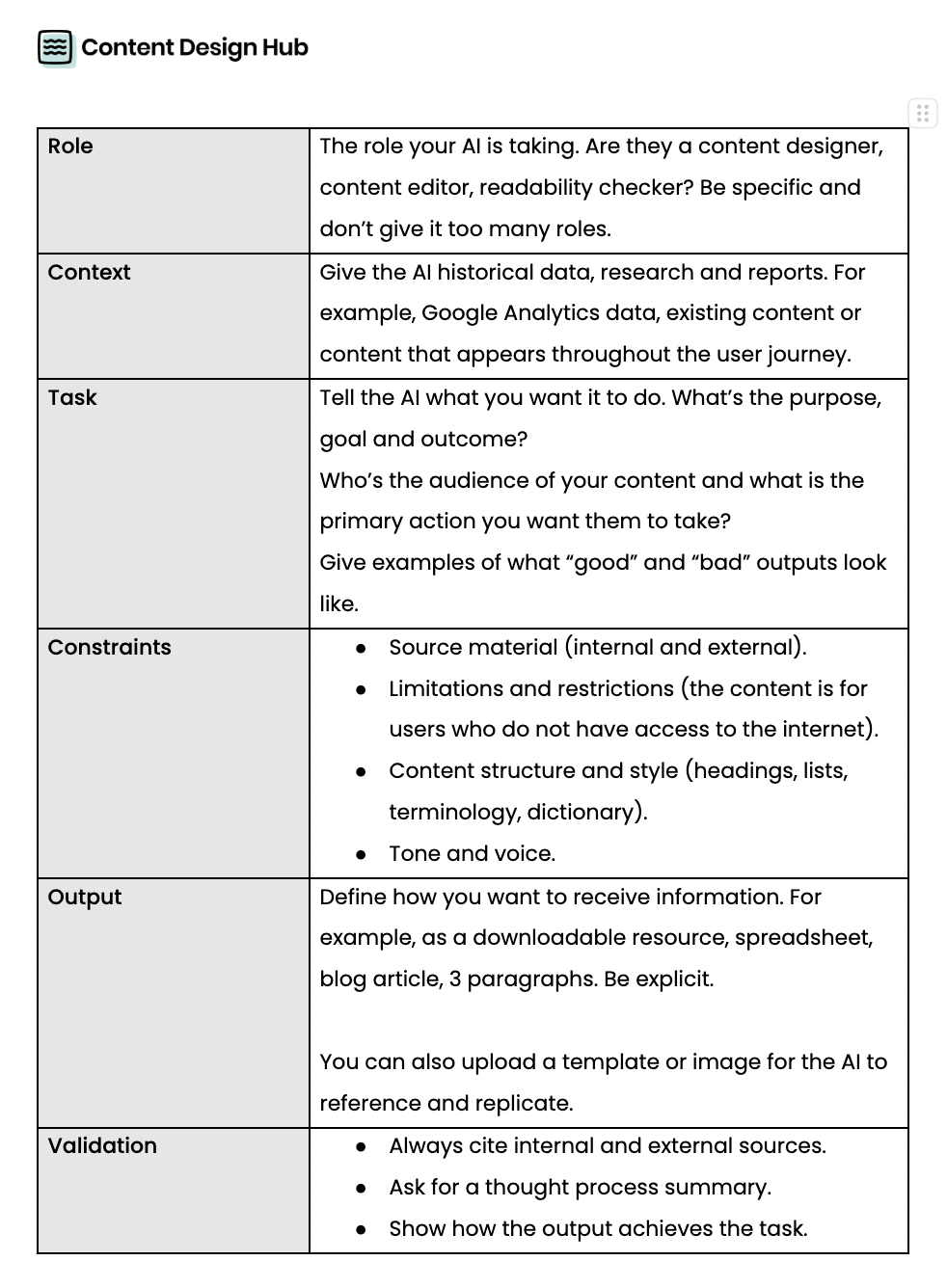
To create a robust prompt, define the Role + Context + Task + Constraints + Output + Validation.
AI hallucinations matter for content governance because they expose weaknesses that already exist in your organisation’s content ecosystem. Large language models (LLMs) generate the most statistically likely response based on patterns in their training data. This means LLMs often guess when uncertain. It’s a behaviour reinforced by how AI systems are evaluated.
AI hallucinates because it lacks data or the data it’s accessing is inaccurate. For example, you may ask for AI to always provide you with a quote. But if a quote doesn’t exist, it will create one. Unless you’ve read the document or ask it to validate and cite the source, you may be none the wiser that the AI output is a hallucination.
Unfortunately, hallucinations are unlikely to disappear entirely. Humans make mistakes. It’s a natural part of our existence. And these mistakes are unintentionally given to AI. However, we are less forgiving when AI makes those same mistakes.
“To err is human” – Alexander Pope
To solve the problem of hallucinations, content creators can apply consistent guidelines and guardrails and output validation techniques.
The real goal is to reduce how often AI hallucinations happen. Content creators must provide AI with consistent content that it can draw from when appropriate.
Where content consistency matters:
Content creators can also develop validation methods, so AI can recognise when it’s uncertain and say, “I’m not sure,” instead of fabricating an answer.
Validation methods include prompting techniques that explicitly ask the model to check its reasoning, verify its sources or state its confidence level.
For example, asking the model to “list the steps you used to reach this answer” or “identify which parts of this response you’re uncertain about” encourages AI to surface ambiguity.
Another method is retrieval‑augmented generation (RAG), where AI is connected to an approved content library. AI knowledge sources are locked down, so it only uses your company's content library and doesn’t access open source libraries it finds on the internet. We want AI to always ground its answers in verified material rather than guessing.
Using AI for the first time may sound scary and risky. Especially, for content designers who know AI may not match their attention to detail.
Implementing AI within your organisation is risky without human control, context, judgement, oversight and evaluation. AI will only continue to expose the gaps in how your content is governed.
When you keep a human in the loop and make them the orchestrator of AI, the rough edges and gaps are spotted early and rectified. With speed, AI will surface the good; not the bad and ugly.
Before you use AI, review your:
When first using AI:
When your foundations are strong, AI has something reliable to work with. Clear standards, validated patterns and consistent voice guidelines give AI the guardrails it needs to be a trusted writing companion.
When organisations establish approved repositories, structured content libraries and clear ownership roles, AI can anchor its responses in accurate information.
Drafting web copy, summarising technical information or creating customer communications becomes faster and more reliable when AI uses governance materials already curated and validated by humans.
In the age of AI, you should look at your content governance model with fresh eyes. Consider how it’s used not only by humans, but by AI. Is your model explicit enough for AI to deliver the same quality and consistency that you expect from your content specialists?
Ultimately, once governance exists, AI shifts from being a risk multiplier to an efficiency enabler. It can automate repetitive content work, scale production, produce low-risk and high-volume content (meta descriptions and product onboarding flows) and support teams with a good first draft. It can do all this without compromising accuracy or brand integrity.
With the right governance foundations, AI helps teams move faster and focus on content task that require creativity and strategic thinking, rather than ones that are repetitive, repeatable and mundane.
.png)