

What is Ditto's Context Hierarchy for AI Generation?
Learn more about the context that goes into every AI output within Ditto (and how to build it yourself).
AI is a powerful writing partner, when used right.
But a lot of teams are approaching generative AI for copy with too narrow a focus.
Their focus is on one oversimplified drafting process: prompt → generation, and repeat. The output, and its success or failure, is entirely reliant on the context in the prompt. But even if you load up descriptions, background info, and caveats into one chatbot input field, the context that real designers use to make decisions (the broader product, the business goals, the user experience, what already exists in production) is kept entirely separate.
When it was a human writing each word on a screen, we brought the context we gathered, just from doing the job. When it’s an agent doing the writing, it only works from exactly what you give it (and doesn’t ask for more, even if it should).
At Ditto, we’ve been thinking about context in terms of a hierarchy. A required checklist of context that any AI agent has to go through before getting to the final output.
This is focused on immediate context (the prompt) but builds outwards:
↳ What the user says (prompts, replies)
↳ What the original text says (existing copy—even if it’s bad)
↳ What we know about that text in context (styling, positioning, role in the design or prototype)
↳ What text sits immediately around it (same flow, same surface, supporting or header copy)
↳ What exists in the surrounding design (frame, screen, state)
↳ Existing patterns and standards (style guide, pre-approved copy library)
↳ What other text exists across the entire product (pre-existing strings)
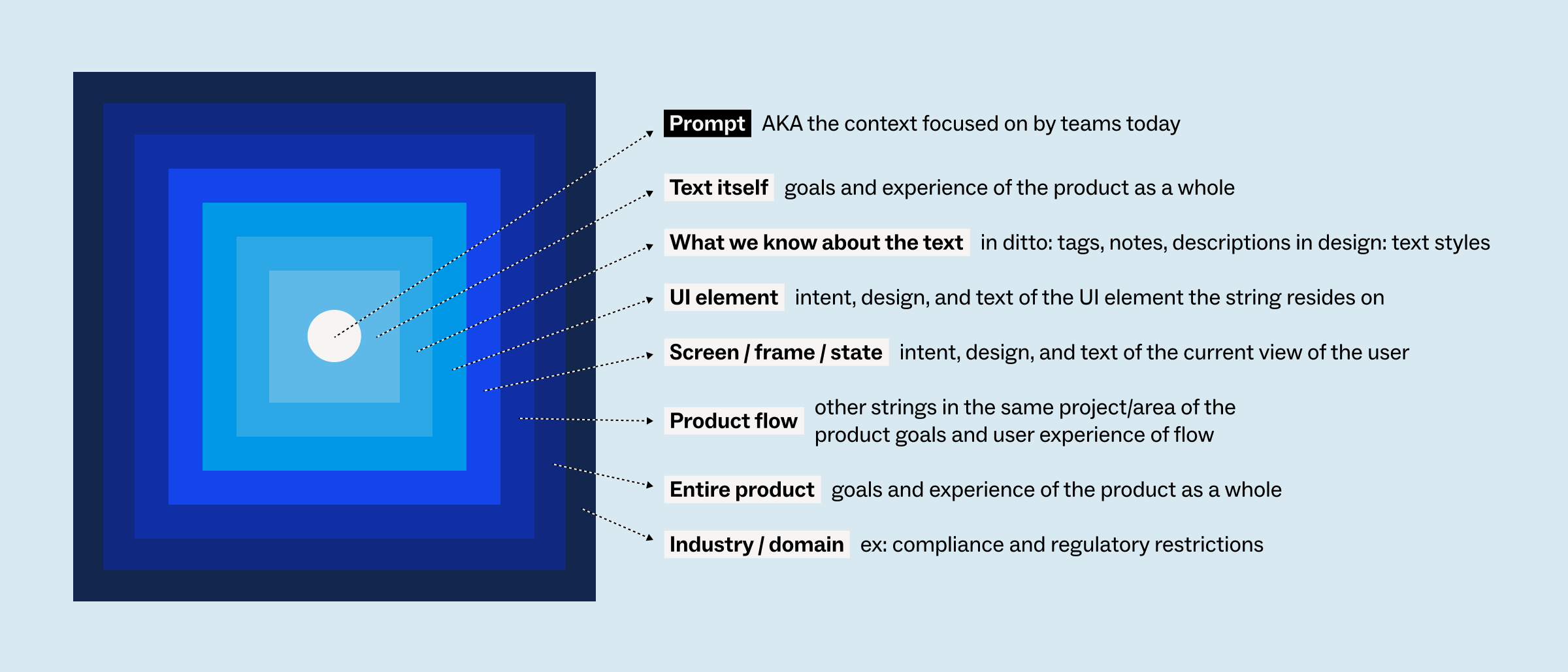
It’s hierarchical, on purpose: Something that Ditto’s Magic Draft reads somewhere else in the product doesn’t inherently override the prompt you’ve given it. But it’s all context, all inputs, to get to the best possible output.
Designing successful user experiences for complex products is hard, even for humans—and it requires a lot of layers of context, brought consistently to every decision being made.
Oftentimes, this wider context is hard to continuously integrate with AI tools that product teams are using to generate product text. When you see AI making mistakes (using terminology incorrectly, localized incorrectly, etc) — thats not the AI failing, that’s the system failing. Claude or another tool might be good in a specific output, a specific screen, or a specific flow, but it is challenging to reliably, consistently pull in the right context into every decision being made.
Ditto has invested in a multi-layered context hierarchy that automatically runs in the background of every text generation, in Figma design or agentic tools, to ensure the same standards, inputs, and context go into every output.