How to build copy guidance into your design system, with Ditto Specs
Build product copy standards into your existing design system, right in code, with Ditto Specs.
Open any component folder in a design system and you’ll see something like this repeatable pattern…
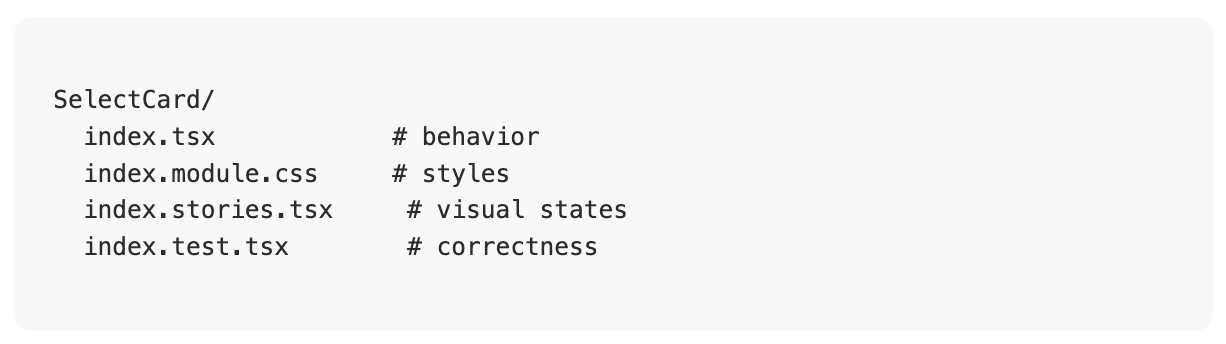
... But there isn’t anything about what the component actually says.
That's the gap Ditto Specs closes: a .ditto.md file that sits in that same folder, declares the component's text surfaces, and carries the style rules that apply to them, synced straight from Ditto.
If you haven't read the announcement, the short version is this — generic, all-encompassing styleguide.md files don’t scale with the complexities of copy so we built Ditto Specs to embed copy rules right next individual components in code, where an agent is already looking. That way, agents (or people) using the design system components get automatic reinforcements when text is being generated or reviewed, at a detailed level.
Making product copy a core player in your design system
Most design systems are organized around atomic design — atoms like buttons and inputs, composed into molecules like a call-to-action row or a confirmation dialog, composed again into whole page sections. Your design system component library mirrors this.
Meanwhile, a style guide has to answer questions at every one of those altitudes at once. What should a button label sound like, on its own? How should a modal's headline relate to the actions underneath it? Does this component inherit brand voice rules that apply everywhere, or does it need something more specific because of what it's asking the user to do?
Right now, most teams answer this with a single flat document. One style guide, applied uniformly, regardless of whether you're writing a tooltip or a checkout confirmation. It's not that the rules are wrong — it's that a flat document can't represent a system that isn't flat.
Specs are organized the same way your components are.
- A
workspace.ditto.mdat the root carries the rules that apply everywhere — brand voice, tone, the stuff that's true regardless of surface. - Component-level specs carry the rest, scoped to exactly the surfaces that component renders.
An agent working three levels deep in a nested component picks up the full stack — workspace rules plus everything scoped to that specific button, that specific headline — without anyone having to hand it a document and hope it reads the right section.
The file you're missing is one you already know how to use
A .ditto.md file is not a separate content management system bolted onto your codebase — it's a file in the folder, versioned with everything else, showing up in the same PR diff as the component change it belongs to. When someone changes the copy of a confirmation button, that's a line in a diff a reviewer can actually see and approve before merging.
This also means Specs slot in next to the design system tooling you're already running, rather than competing with it. If your team documents components in Storybook or Zeroheight, that documentation is answering "what does this look like and how do I use it." Specs answer "what does this say" — same components, adjacent question, sitting side by side.
Here's what a spec looks like for a modal — one file, three consumers reading it for three different reasons:
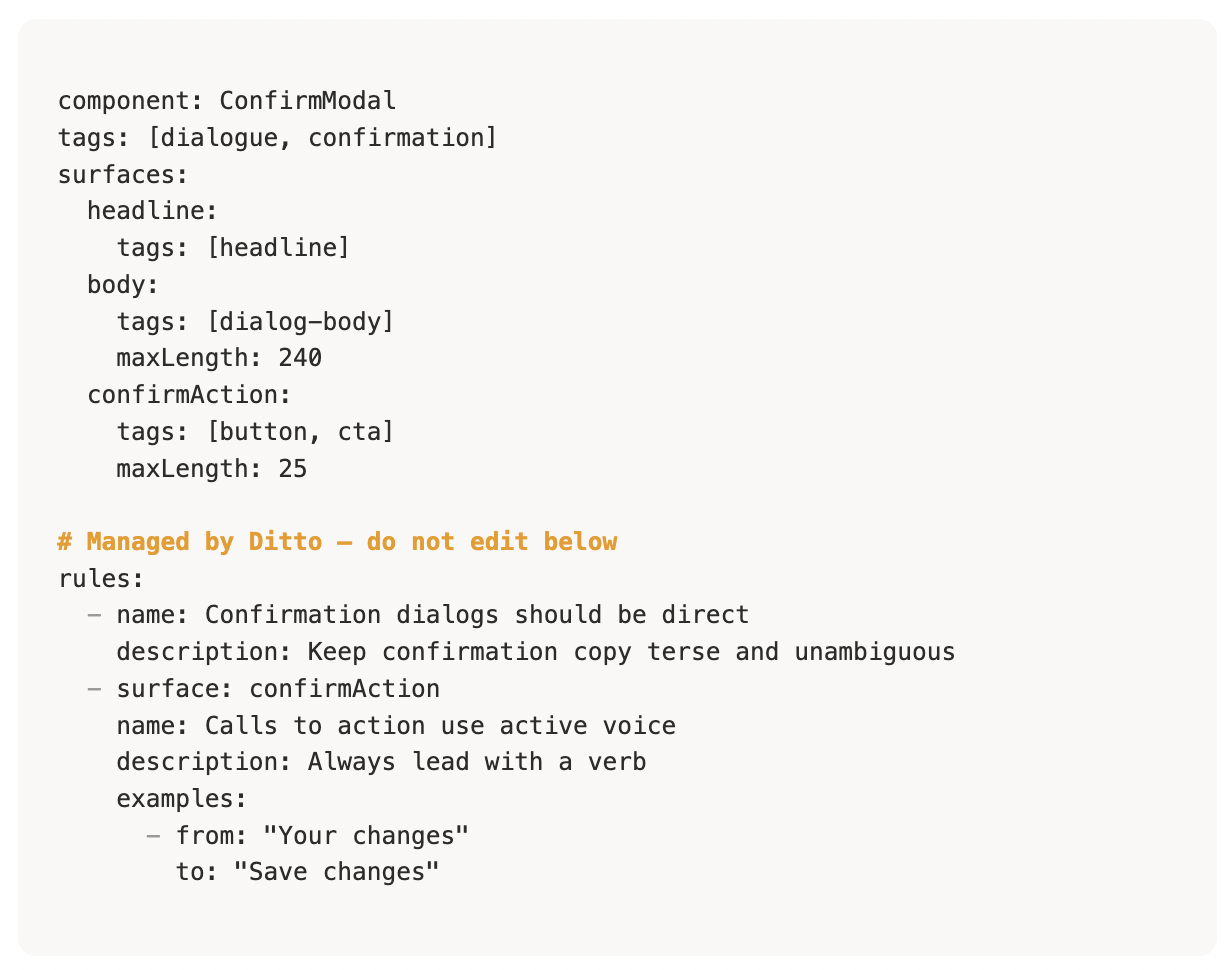
The top section is yours — whoever builds the component declares what it says and tags each surface. The bottom section is Ditto's — synced automatically, never hand-edited, always current with whatever's live in your style guide. Change a rule in Ditto and every spec that references that tag picks it up the next time someone pulls. Nobody has to remember to update a doc or remind an agent to pull the right guidance.
Setting it up
If you already have a style guide in Ditto, Ditto Specs just requires one CLI call to get going. Ditto’s Agent Package can help you configure this, as well as our other AI tooling, in minutes. Point an agent like Claude at your codebase, and it scaffolds spec files for your existing components and pulls in the matching rules by tag. You don't have to do everything from scratch - let Ditto get things set up for you automatically based on what you've already built.
If you don't have a style guide yet, Ditto can infer one by looking at the components and copy you already have and set the first version up alongside you. Either way, once specs are in place, this isn't something your team manages day to day. New component, new spec, one scaffold command. Rule changes flow through on a pull. The infrastructure just sits there and does its job.
Your design system already decided what your product looks like. It's about time it decided what your product sounds like too.
Want help wiring this into your team's design system? Book a kickoff call and we'll get your specs set up together.