
Product releases, updates, and general improvements to Ditto

What’s New

June 22, 2026

Ditto Specs

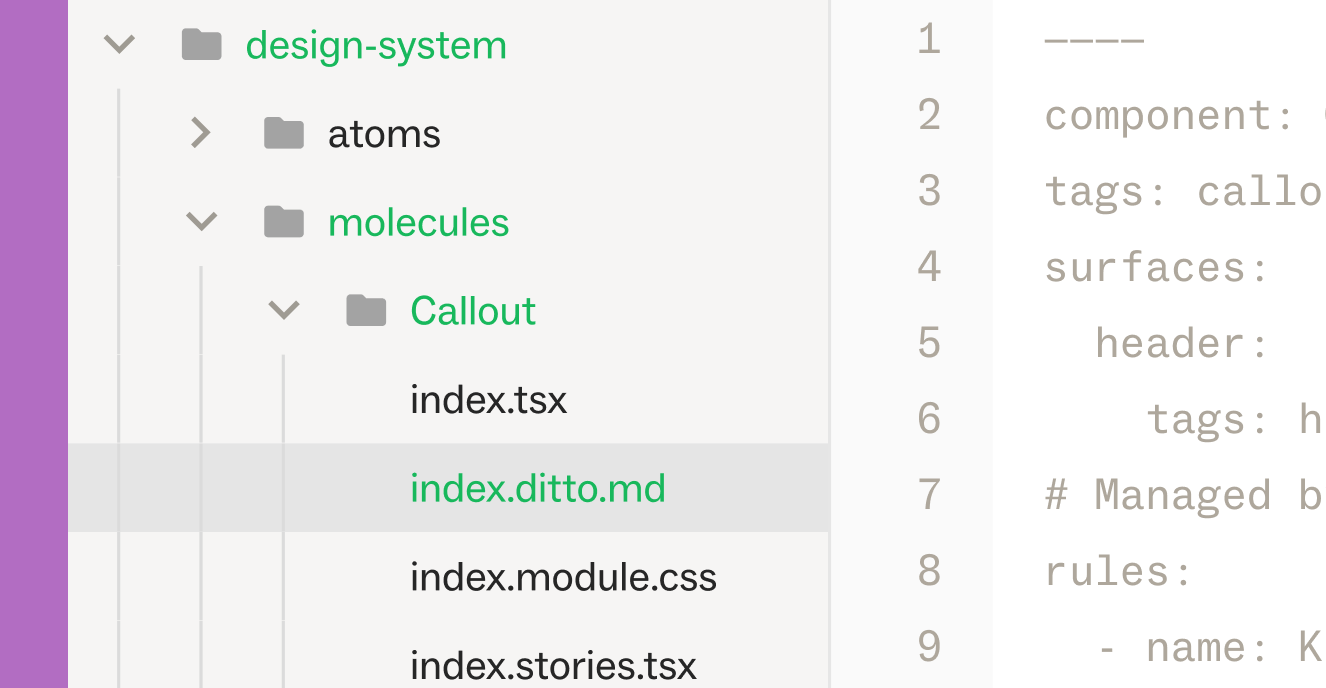
Ditto Specs are .ditto.md files that live in your codebase alongside your components. Each one declares the text surfaces a component renders — the specific pieces of user-facing copy like a headline, a button label, helper text, a tooltip — and carries the style guide rules that apply to those surfaces, synced from the Ditto platform.

Specs work at every level of your codebase.

  • A workspace.ditto.md at the repo root sets the floor: universal voice, tone, and brand rules that apply everywhere.
  • Component-level specs layer on specifics. An agent working on a deeply nested UI component references the right rules for the specific surface it's touching.
Read more about how to use Ditto Specs here.

June 20, 2026

Strikethrough rich text support

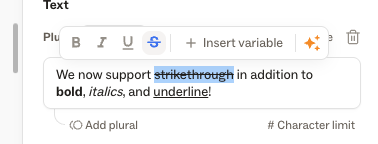
We now support strikethrough rich text within Ditto! Add strikethrough text to a Ditto text item, along with bold, italicized, and underlined text.

June 18, 2026

Global Search

A new dedicated Search page, accessible from the Ditto web app's side nav, for finding text items and library components across your whole workspace.

Search by text value, developer ID, component name, or notes and Ditto will surface related data in your Ditto workspace.

Filter results by project, status, assignee, variant, and tags, or narrow your search scope by Variants, text items, or components.

Clicking a result from the Search page will bring you straight to the matching text item or component.

Newsletter

Never miss an update: Sign up for updates, exclusive insights, and product releases.

Thank you! Your submission has been received!
Oops! Something went wrong while submitting the form.
Help Center

Get the most out of your Ditto workspace.

Help Center
Dev Hub

Explore Ditto’s capabilities for developers.

Dev Hub
Newsletter

Never miss an update: Sign up for updates, exclusive insights, and product releases.

Thank you! Your submission has been received!
Oops! Something went wrong while submitting the form.