


Ditto | What's New
What’s New
Simplified copy import
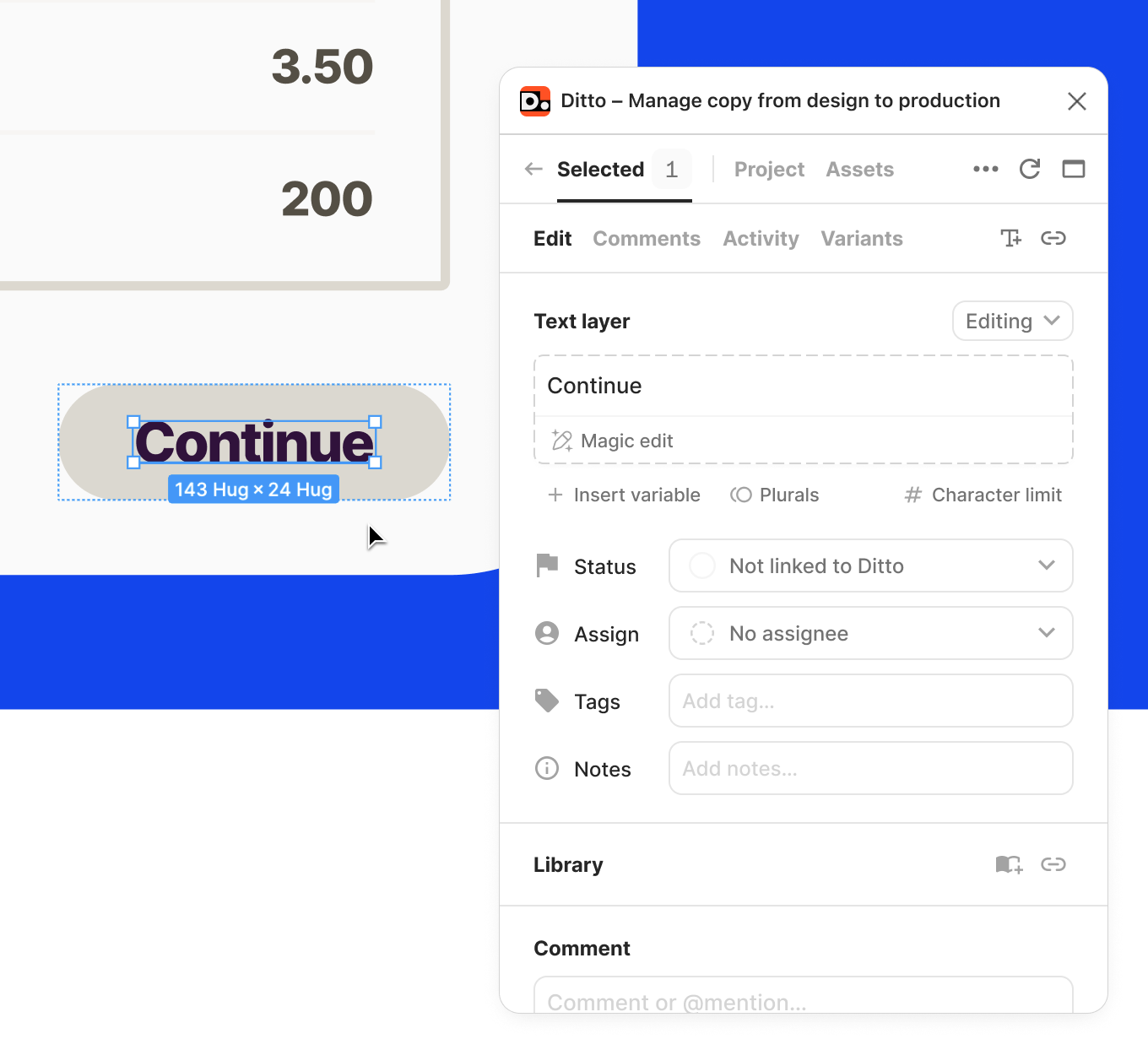
Setting up a Ditto project and importing copy shouldn't stand in the way of your work. Now, you have access to all of the functionality in Ditto (status, commenting, AI-enforced suggestions from your style guide)—without needing to import text or create blocks first.
- In the plugin's “Selected” tab, we’ll show all text layers in your selection. If a text layer isn't linked to Ditto, it’ll show up with a dashed outline.
- Once you take action on a text layer with the plugin (whether by editing the text, leaving a comment, setting a status, etc.), Ditto will handle the import for you by automatically creating a new text item in the Ditto project and linking the text layer to it.
You can still do all of the same manual setup actions as before (create text items, create blocks, link text layers to existing text items), but you don't have to, and it won't block you from getting started.
September Product Releases
- Character limits: you can now add character limits to any text item, to make sure your copy fits with designs.
- Redesigned email alerts: Never miss a message, with email alerts for @-mentions, replies, assignments, edits, and more, with links right to the conversation in your Ditto workspace. Customizable in workspace settings.
- New design thumbnails in the Ditto web app: When you toggle to Design Preview in the Ditto web app, you'll now see thumbnail previews of each design frame in your lefthand panel.
- Start from the frame view: Projects that are connected to Figma will automatically open to Ditto’s frame view in the web app, to start with design context.
- New Ditto branding has made it into production. 🥳
- The "Recents" panel on the web app homepage now surfaces both legacy and new Ditto project updates.
Export for projects and components
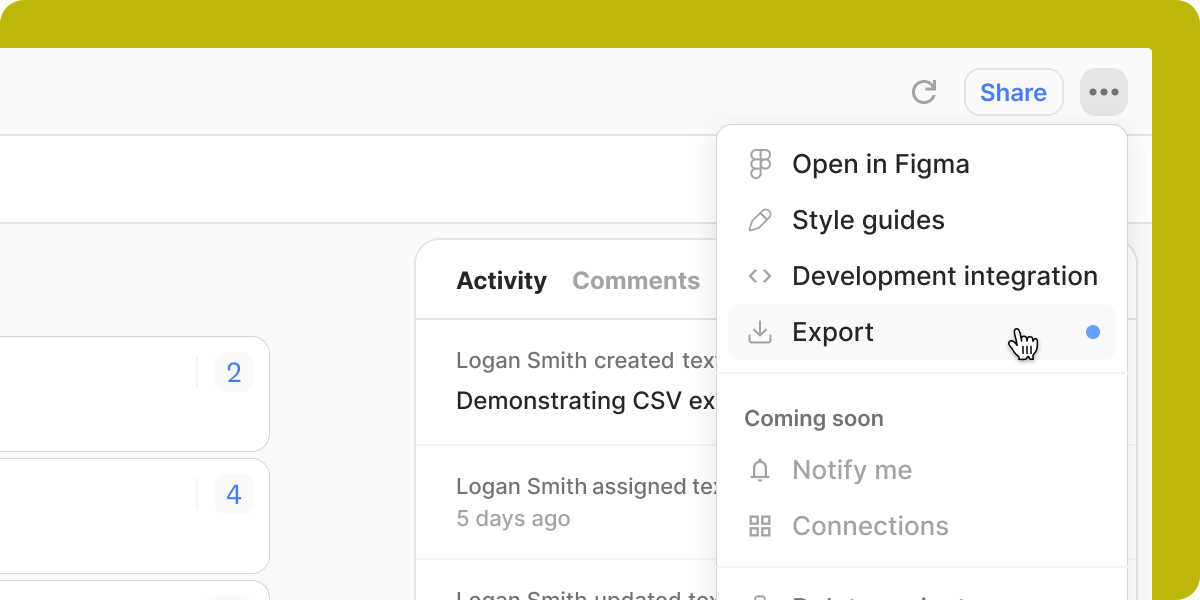
CSV export is now available for legacy and new Ditto projects: Just select the dropdown menu at the top right in the web app to export all the text in that project.
In-product notifications hub
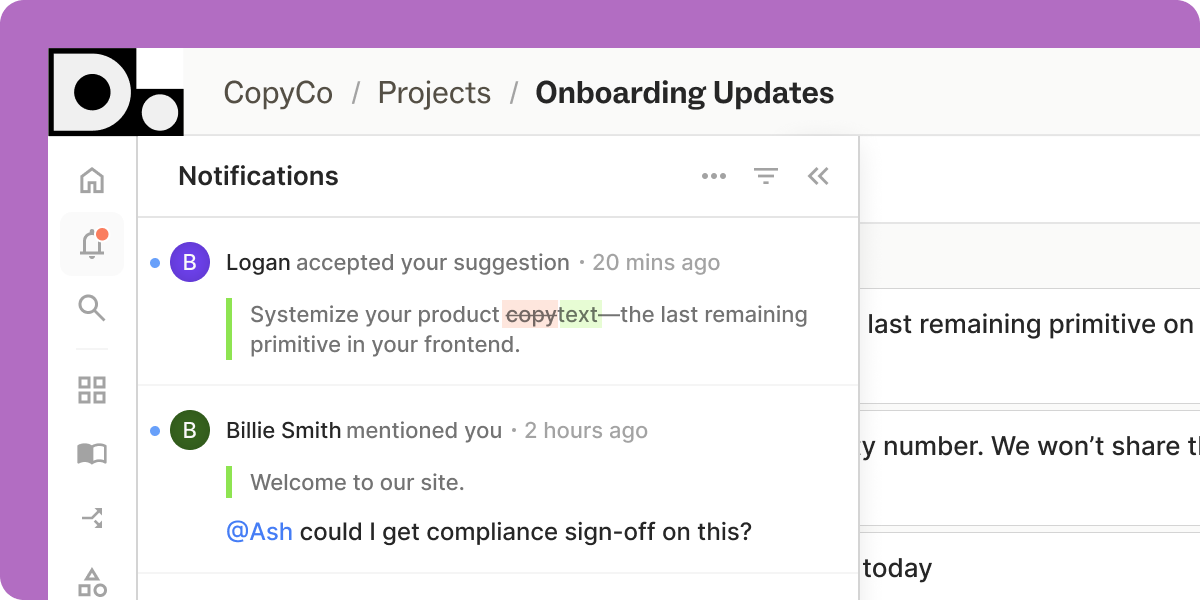
Notifications have been given their own dedicated page in Ditto. Filter and sort your notifications, contextualize new comments in full threads, and work through all open tasks from one view.
Webhooks for new Ditto
Webhooks are now available for all new Ditto projects! Now, developers can get real-time updates on changes in Ditto. Configure which updates you want to send, for which projects, all within Ditto. Read the details in our new developer documentation.
AI-enforced style guides
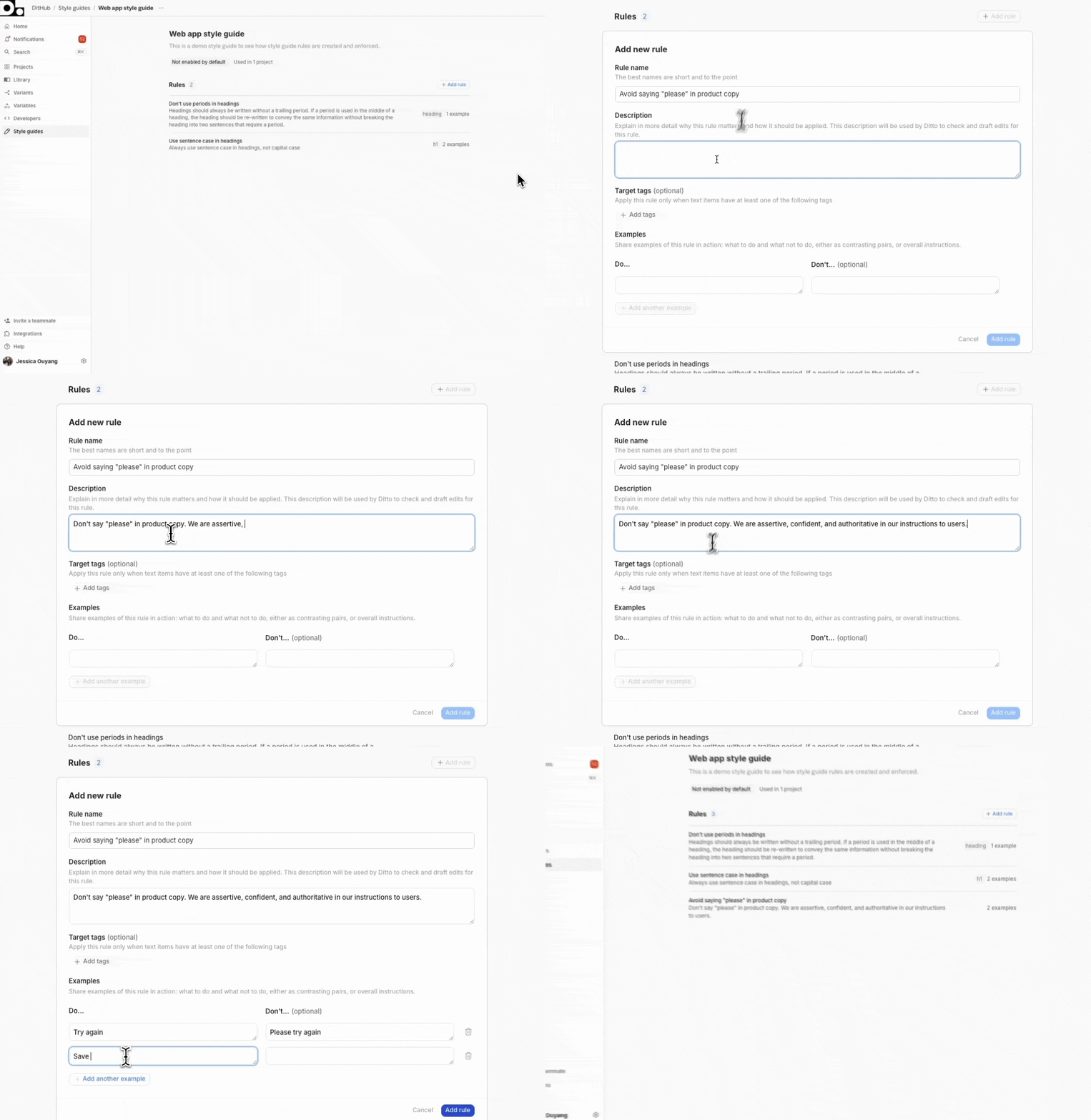
Make your content style guides usable, and turn AI into your greatest copy sidekick. Write, edit, and enforce copy guidelines, with Ditto’s AI.
AI-Enforced Style Guides: Make your content style guide actionable. Build your custom rules right in Ditto, then let AI enforce it for you.
- Define approved and banned terminology
- Capture voice and tone guidelines
- Document text formatting, spelling, and grammar rules
Magic Edit: Enforce style guide rules and surface edits as your team writes, with Magic Edit. Ditto will automatically suggest edits, and surface the rules behind the suggested edit. Then, they can accept or reject based on context.
Commenting improvements
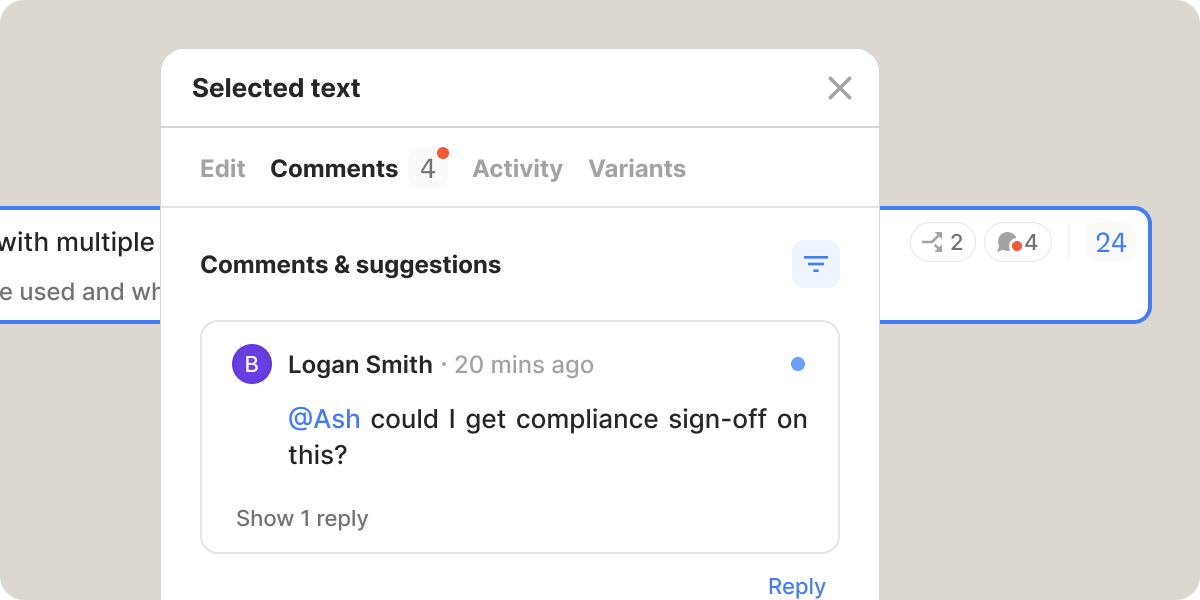
We’ve made conversations much easier in Ditto, with improved usability and actionability of comments in Ditto. This includes better read/unread indicators, clearer visibility of unread comments, and improved filtering to find your comment threads faster.
June Product Releases
Before we jump into the good stuff, an exciting update: We’ve launched a brand new help center! Check out detailed breakdown of each Ditto feature in our new feature guides, or learn some recommended workflows in our new how-to guides.
Now, let's run through some of the exciting features your workspace has access to, for all beta projects.
See Developer IDs in Figma layer names: For workspaces with dev integrations, you can turn on the ability to see Dev IDs in the Figma layer name. To turn this on, just select the menu button in the top right corner of the plugin, hover over “Settings,” and select “Enable Developer IDs.”
You can now see the full folder path (main folder and sub-folders) when publishing text items to a library component, so you know exactly where you’re publishing.
”Fuzzy” component matches: Now, whether you’re publishing or linking components in the web app or the plugin, you’ll see more Ditto suggestions. There are now a few different “fuzzier” suggestions when Ditto recognizes similar copy to an existing component — no longer requiring an exact text match to suggest as an option.
- “Exact match” — perfect match
- “Almost exact match” — differs only in styling or casing
- “Close match” — 80% similarity
- “Similar match” — 50% similarity
Comment right from the “Comments” tab: Don’t worry about going back to the edit panel to leave a new comment — if you’re reading through the conversation on a text item or component, you can now add a comment straight from that same tab.
Multi-select text items to create a block: When organizing your text items in the web app, just CMD+Click (or CTRL+Click) to select multiple text items and add those to a new block.
De-select individual text items to import: When you select a Figma frame with multiple text items, but you don’t want all those text items in Ditto, now you can de-select the ones you don’t want to import.
Improved selection history/back button in the plugin: The plugin back button will now preserve your exact selection within the Figma file.
Improved diffs in activity log: We’ve made text diffs (showing you how a text item was rewritten) much more usable in the activity log, so you can easily read through changes.
Apply variants to Figma frames
.gif)
Review a Ditto variant in existing Figma design frames, without manually duplicating or creating new frames, with new Apply Variants functionality!
To change the text in a Figma design frame to contain the text from a Ditto variant, you can apply a variant to a frame in your design file. Applying a variant directly edits the text in your Figma file to display variant text.
How to apply a variant:
- Select a top-level text frame
- Click “Apply variant” to see a list of your available variants
- Select the variant you would like to apply
Want to roll back the change? Open the menu again and either choose the selected variant to deselect it or click “Reset" to revert back to base text.
Frame view for Figma projects
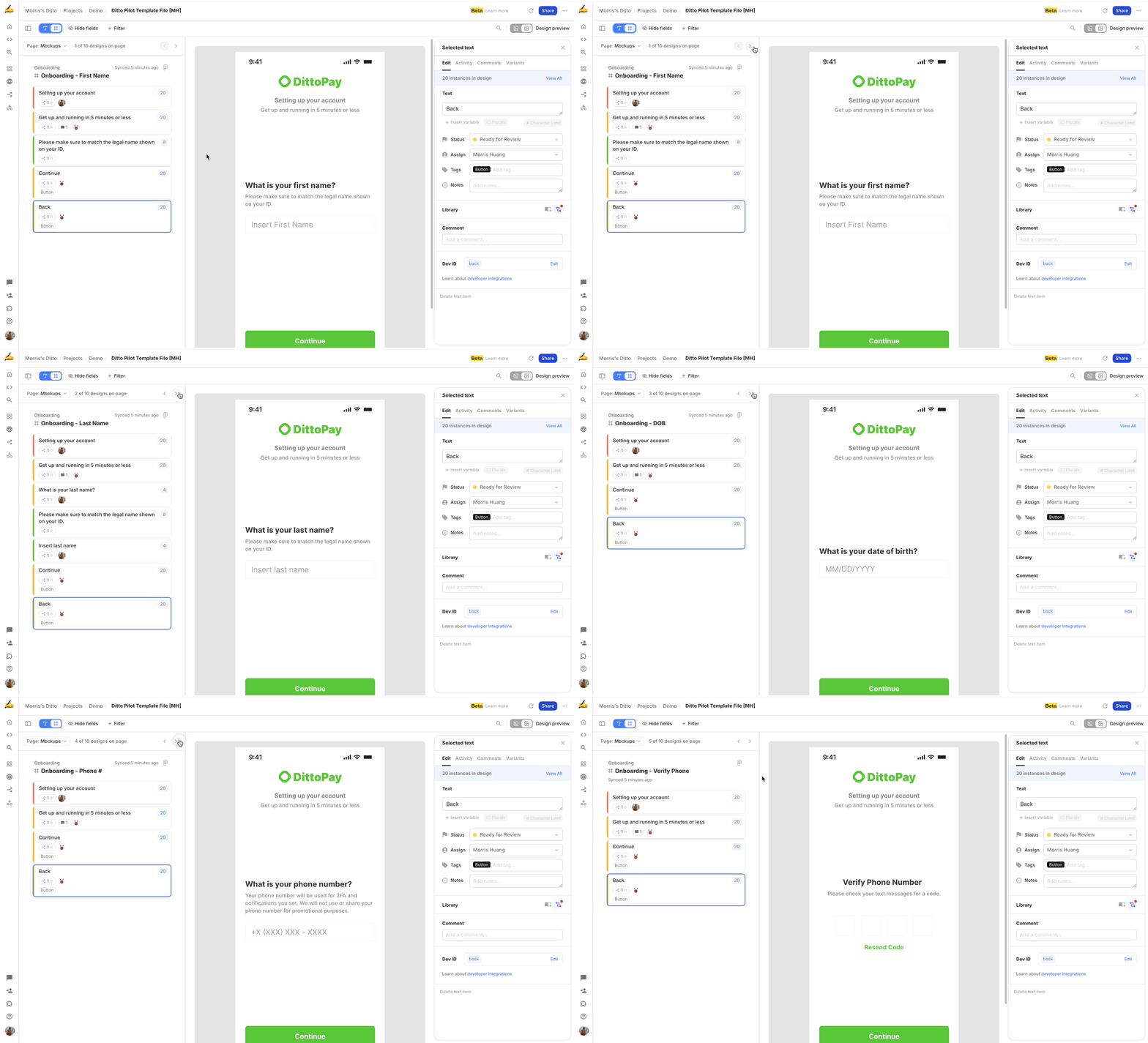
Navigate your Ditto project in frame view
Now, you can navigate and work through a Ditto project within the context of the Figma design frames! You now have the option to choose between “list view” — aka a list of text items — or new “frame view,” which pulls in Figma frames you’ve linked, so you can review the text in designs.
This makes it clearer where the text you’re looking at lives within the context of the broader designs. You can step between design frames with arrow keys, then click on any block or text item from the lefthand panel, and it will highlight it on the design preview.
August bug fixes + improvements
Even more significant plugin performance improvements for users with big files or lots of components — you should see Ditto loading even faster!
CMD + B now automatically opens or closes all groups and blocks
When you select a component in the web app, you will automatically be scrolled to that component in the side nav list view
Instasync now runs progressively, which results in a way faster experience when adding to your selection to Figma
Manually merge components together for both single and multi selections in the component library
We’ve made some major under the hood improvements to our export logic in the component library, so large component exports now take seconds (as opposed to minutes)
Bug fix: Project names, frame names, and workspace names can now be edited
Bug fix: Comment notifications will now correctly display the comment thread and focus the reply box
Bug fix: Components created in the plugin will no longer be named instead of 'Name'
Bug fix: CSV exports will now show variant text
July bug fixes + improvements
You can now change the variant status for multiple text items or components at once
Multi-edit character limits when selecting multiple text items or components
Bulk accept & ignore of component merge suggestions
We now display the actual variant name when a variant is applied and a text item is selected in the plugin
Plural support in nested format for exports
Improvements to pagination controls in the component library
Bug fix where selection would fail to load in plugin if a text item outside a frame was selected as a part of a multi selection
Bug fix where new project comments were not loading automatically
Bug fix where users could see project folders they didn't have permissions for
Bug fix for sample components navigation when directly linked
Bug fix where variant previews weren't being reverted when you selected a text item on a previewed frame