


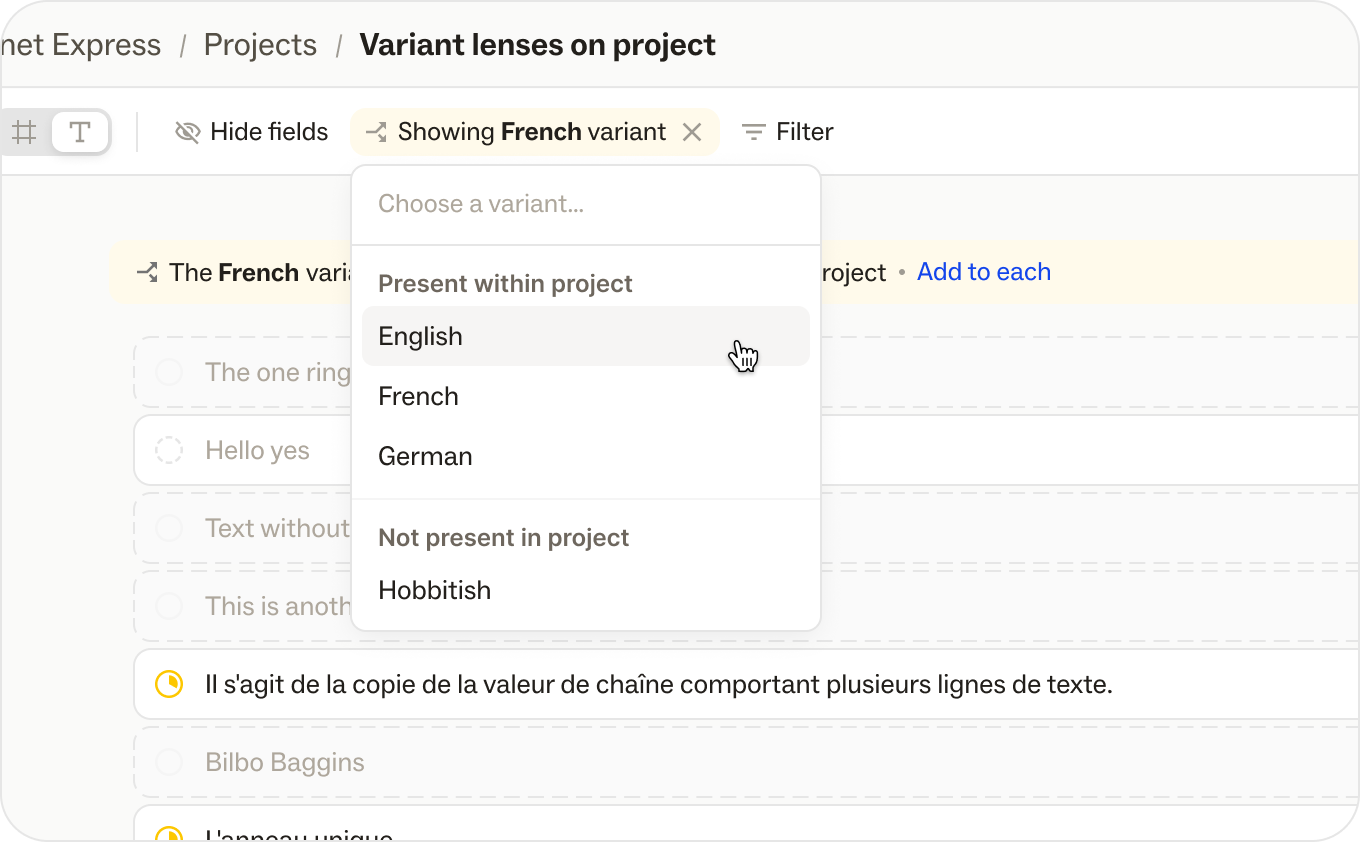
You can now choose a variant from the filter bar in the Ditto Web App to display, edit and bulk add variants. You can select a variant from the dropdown list in a single Ditto Project or in your Ditto Library, from either Text or Frame View. Once selected, all the metadata will switch to that Variant's metadata.
If not all items in that view (project, frame, library folder) have the active variant, you will see a banner with a button to add the variant to every item in the view. This will add the Variant with default empty text, so your team can work through each text item that still needs a Variant.
.png)
We’ve introduced Magic Draft, your AI writing assistant built to help you draft, refine, and reuse product copy right inside your design files. By leveraging your existing Ditto library and design context, it generates context-aware copy suggestions for everyone on your team.
Generate initial copy drafts and make quick edits using an LLM that pulls from your project’s metadata, style guides, and surrounding design elements.
How it works:
Key features and considerations:
Magic Draft is currently available to all users with a Ditto account, within the Ditto Figma plugin. Drafting from the web app is not supported at this time.
Read the full details on Ditto's Help Center.
.png)
Make Ditto work with your own team’s processes with new custom statuses. Capture specific stages—like "Legal Review," "Blocked," or "Ready for Translation"—to manage the work your way.
A few things to note:
Custom statuses are available for teams on our Enterprise plan. If you’re on a different plan, upgrade in your settings or reach out to our team to get access.